

Categories
Important Links
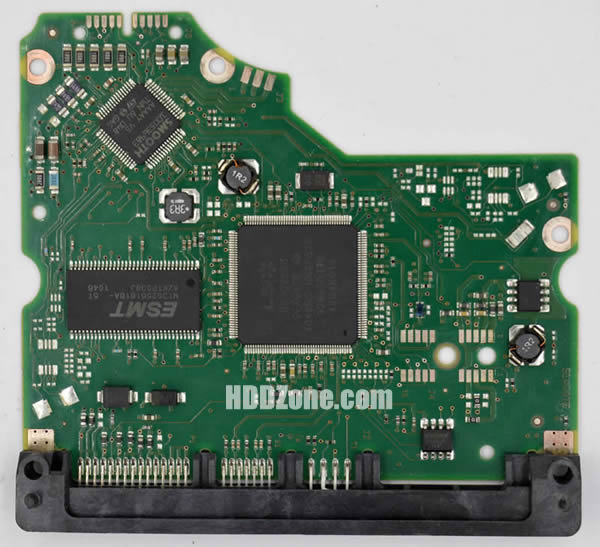
Data Recovery Methods for HDD PCB Failure
When HDD PCB was failure, the HDD would not be recognized. In this situation, we can do data recovery by 2 methods: repairing or replacement.
If you know some circuit check and repair knowledge, you can use tools, such as multimeter to check the HDD PCB's failure, and then repair the failure.
HDD PCB's common failures are: HDD can't power up normally and the HDD can't spin with power. We can check and repair the problems by voltage test method, resistance test method, etc. then do data recovery finally. Specific methods are as below:
1.Check the PCB's appearance.
First check whether the PCB's components deformation, discoloration or fracture, etc. If the PCB has the above problems, you need the repair or replace the damaged components.
2.Check the power supply situation.
Using a multimeter to measure 12V and 5V power supply's ground resistance. If the resistance is less than 100Ω, it means the PCB's protection circuit is damaged, then check the protection diode or insurance resistance is in good working condition or not.
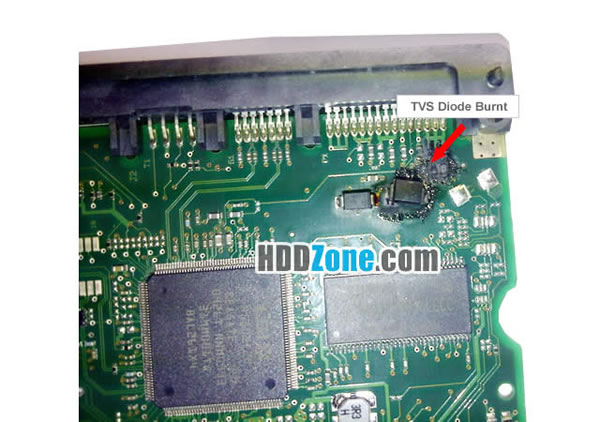
3.Check the motor controller IC.
If the ground resistance of HDD PCB's protection diode or insurance resistance is 10~1000KΩ, it means the protection circuit is in good working condition. Then test the test the output port of the motor controller IC's ground resistance (i.e., the contacts of spindle motor and the PCB). If the ground resistance of motor controller IC's out port is 10~1000KΩ, it means the motor controller IC output the voltage. If the ground resistance of the motor controller IC's output port is less than 10Ω, means the motor driver chip doesn't output voltage. The failure should be caused by Motor Controller IC damage/power management chip damage/12V,5V supply line's capacitors, inductors, FET transistors, etc. damage/the crystal oscillating circuit damage.
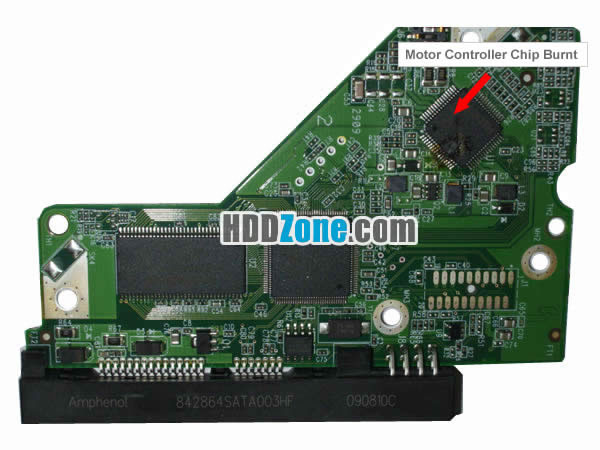
4.Check the power management chip and FET.
check the power management chip output voltage, including the FET output voltage is 3.3V/5.5V or not (some models of HDD PCB may use the negative voltage). If the voltage is abnormal, it maybe caused by FET damaged. We should check the FET is normal or not. If it is normal, it means the power management chip damaged. We need it change it.
5.Check other components.
If the power management chip output voltage is normal, we should check the 12V, 5V supply line's capacitors, inductors, FET transistors, etc. is normal or not. If they are abnormal, we should change the damaged components.
We should know some circuit knowledge when we do HDD PCB check and repair. If only want to recovery the data from HDD, the easy way is replacement the whole PCB.Just need to find a donor PCB to replace the damaged one. Then let the HDD work in normal and get back the data.
Replace PCB has some methods and skills. If you don't do it correct, the HDD will still can't be recognize. Here are 2 point:
1) Find a correct donor PCB. You can refer: How to find a matching PCB?
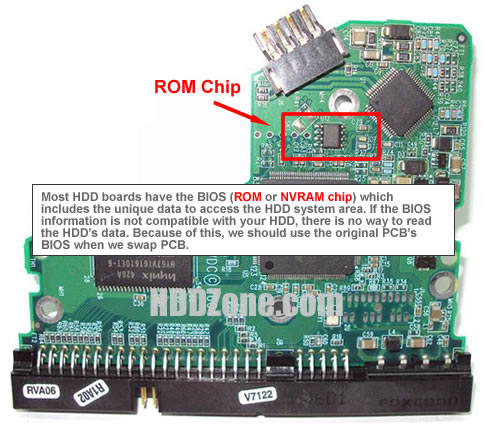
2)Change BIOS.
Most PCB has a BIOS chip. Every BIOS chip includes the unique info, which compatible with your damaged HDD. Without the info, the HDD will not work as normal, so we should move the damaged PCB's
BIOS to the replacement PCB. Then the HDD can be recognized.
Back to Home: HDD PCB Rescources
Why Choose US?
✓ Over 1000+ PCB Types;
✓ 100% Tested Working;
✓ Free Shipping Worldwide;
✓ Secure Shopping by Paypal;
✓ Professional Technical Support;
✓ Customer Loyalty Discount;